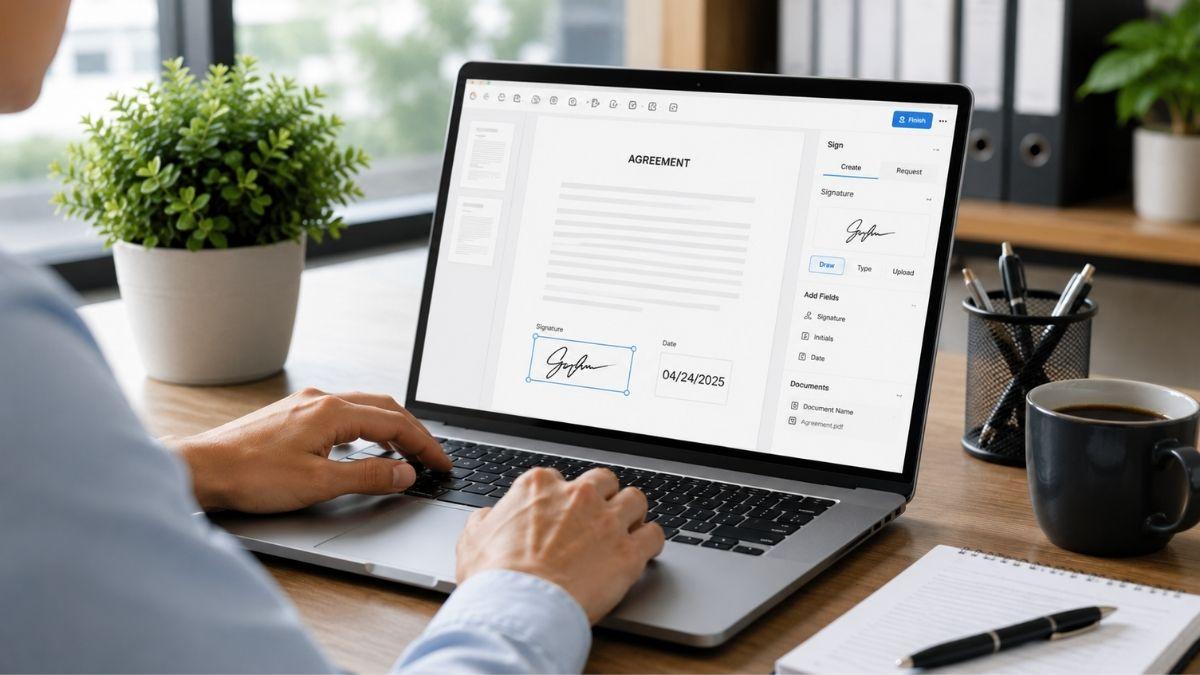
Managing forms should not require printing, scanning, or switching between multiple tools. For teams that handle contracts, onboarding paperwork, applications, surveys, or approval forms, every extra step can slow down the entire process.
DocHub helps simplify document workflows by turning static PDFs into fillable forms, reusable templates, and secure digital documents. With editing tools, eSignatures, cloud integrations, and collaboration features in one platform, users can manage documents from creation to completion without unnecessary delays.
Create Fillable PDF Forms with Ease
DocHub allows users to convert static PDFs into interactive fillable forms through a simple drag-and-drop interface. Instead of rebuilding documents from scratch, users can upload existing files and add the fields they need.
Form fields may include:
- Text fields
- Signature fields
- Initials
- Date fields
- Checkboxes
- Dropdown menus
- Custom input fields
This makes DocHub useful for business forms, client intake documents, consent forms, employee paperwork, and internal approval documents.
Build Reusable Templates for Repeated Workflows
Many organizations use the same documents again and again. DocHub’s template feature helps reduce repetitive work by allowing users to save frequently used documents as reusable templates.
Teams can create master templates for contracts, onboarding forms, surveys, applications, healthcare paperwork, and standard business documents. Each new copy can be filled out, signed, and tracked without changing the original template.
This helps keep responses organized and makes recurring document workflows easier to manage.
Assign Roles and Responsibilities
Complex documents often require input from more than one person. DocHub allows teams to assign specific roles to individual form fields, helping each participant understand what they need to complete.
This is useful for approval chains, multi-party agreements, HR documents, and client-facing forms. By assigning responsibilities clearly, teams can reduce confusion and improve accountability.
Share Forms and Collaborate Securely
DocHub provides several ways to share documents. Users can send forms through secure links, email, or public URLs depending on the workflow.
Teams can collaborate with internal users, clients, vendors, students, or external partners while controlling what each person can do.
Permission settings may allow users to:
- View documents
- Edit fields
- Sign forms
- Add comments
- Complete assigned sections
This helps protect sensitive information while keeping collaboration simple.
Edit PDFs Without Extra Software
DocHub also includes PDF editing tools, so users do not need a separate platform after creating a form or template.
Users can add or edit text, insert images, draw on documents, highlight sections, underline text, apply strikethroughs, or redact sensitive details. Page management tools also allow users to merge, split, rotate, reorder, duplicate, or remove pages.
These features make DocHub more than a form builder. It supports the full document editing process.
Convert and Export Documents
DocHub supports flexible document conversion and export options. Users can convert documents to PDF and export files into formats that work with other systems or stakeholders.
This helps teams repurpose documents across different platforms without disrupting existing workflows.
Collect Legally Binding eSignatures
DocHub includes built-in electronic signature tools, removing the need for a separate signing platform. Users can create signatures by typing, drawing, or uploading an image.
The platform also supports multi-recipient signing workflows. Documents can be sent to several signers either in order or at the same time.
Signature tracking helps users see where a document stands in the approval process. Audit trails also record document activity, supporting compliance, accountability, and dispute resolution.
Connect with Cloud Storage Platforms
DocHub integrates with major cloud storage and productivity tools, including Google Drive, Dropbox, OneDrive, and Box. Google Workspace users can also access DocHub through the Google Workspace Marketplace.
These integrations allow users to open, edit, sign, and store documents within their existing cloud systems. Gmail integration also makes it easier to send and manage documents directly from email.
Work Across Devices
Because DocHub is web-based, users can access it from a browser without installing software. Native iOS and Android apps also make it possible to manage documents from mobile devices.
Real-time cloud saving keeps documents updated across devices, helping users continue work from a desktop, tablet, or smartphone.
Protect Sensitive Documents
Security is important for organizations that handle contracts, healthcare forms, financial records, education documents, and customer information.
DocHub uses AES-256 encrypted storage and SSL-encrypted data transmission to protect files. Two-factor authentication, password protection, and access controls add further layers of security.
The platform also supports GDPR, HIPAA, and SOC 2 compliance standards, making it suitable for industries that manage regulated data.
Practical Uses Across Industries
DocHub can support many document-heavy workflows.
Healthcare teams can use it for patient intake forms, consent documents, and medical paperwork. Educational institutions can manage student forms, assignments, and classroom documents. Businesses can use it for contracts, vendor agreements, employee onboarding, and customer applications.
Solo professionals and small teams can also benefit from the same tools without needing a large document management system.
A Smarter Way to Manage Forms and Templates
DocHub brings form creation, reusable templates, PDF editing, eSignatures, sharing, and security into one platform. This helps teams reduce manual work, avoid tool switching, and complete document workflows faster.
For organizations that manage forms regularly, DocHub provides a more efficient way to create, share, sign, and track documents from start to finish.